
Security that doesn’t wait.
Most security sits and waits for an alarm. Ours goes looking, across your cloud, your computers, your email, and your browsers. All of it connected, and all of it run by people who don’t sit still.
Where we stand
We’re not like everyone else.
Our people aren’t like everyone else.
Our approach won’t be like anyone else’s.
Threats change every week, and security that stands still falls behind. We keep moving, which is why what we can build for you is endless.
Insanely proactive
We go looking for trouble. So it doesn’t find you.
Waiting for an alarm is the old way. This is what runs every day, before anything has gone wrong.
Every computer checks in
Health, updates, disk encryption, the firewall, and antivirus are checked on every managed computer. A gap gets closed before someone else finds it.
Updates on a schedule
Patches are reviewed, approved, and timed around your working day, so known holes don’t stay open.
Bad sites stopped early
Known-bad and lookalike websites are blocked at the lookup, before the page ever loads.
Your name, watched
We watch for new web addresses registered to look like yours, and for staff email addresses that turn up in breach data.
Backups that get checked
A missed or failed backup opens an alert and a ticket by itself, so nobody finds out on restore day.
People who get sharper
Short security lessons, plus AI Safety training that every person on your staff is assigned from the start.
All connected
Cloud. Endpoint. Email. Browser. One picture.
An odd sign-in means little by itself. So does a new inbox rule. Put them on one screen with what the laptop and the browser saw, and you have a story you can stop.
- Cloud
Sign-ins and activity in Microsoft 365, Google Workspace, and Azure.
- Endpoint
Every managed computer reports its health and its security events.
- Email
Suspicious messages, including the ones your own people report.
- Browser
Risky and lookalike sites, blocked before the page loads.
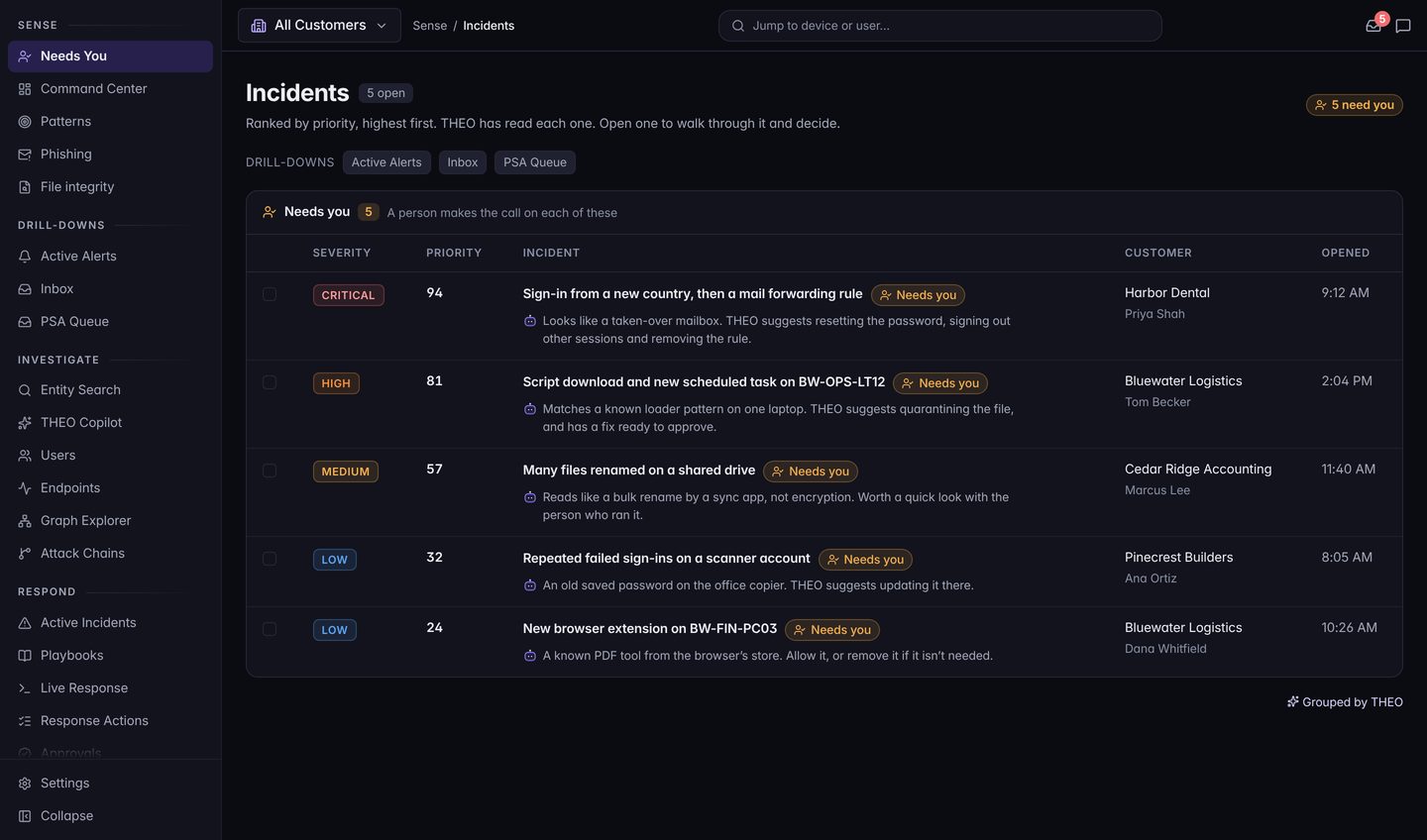
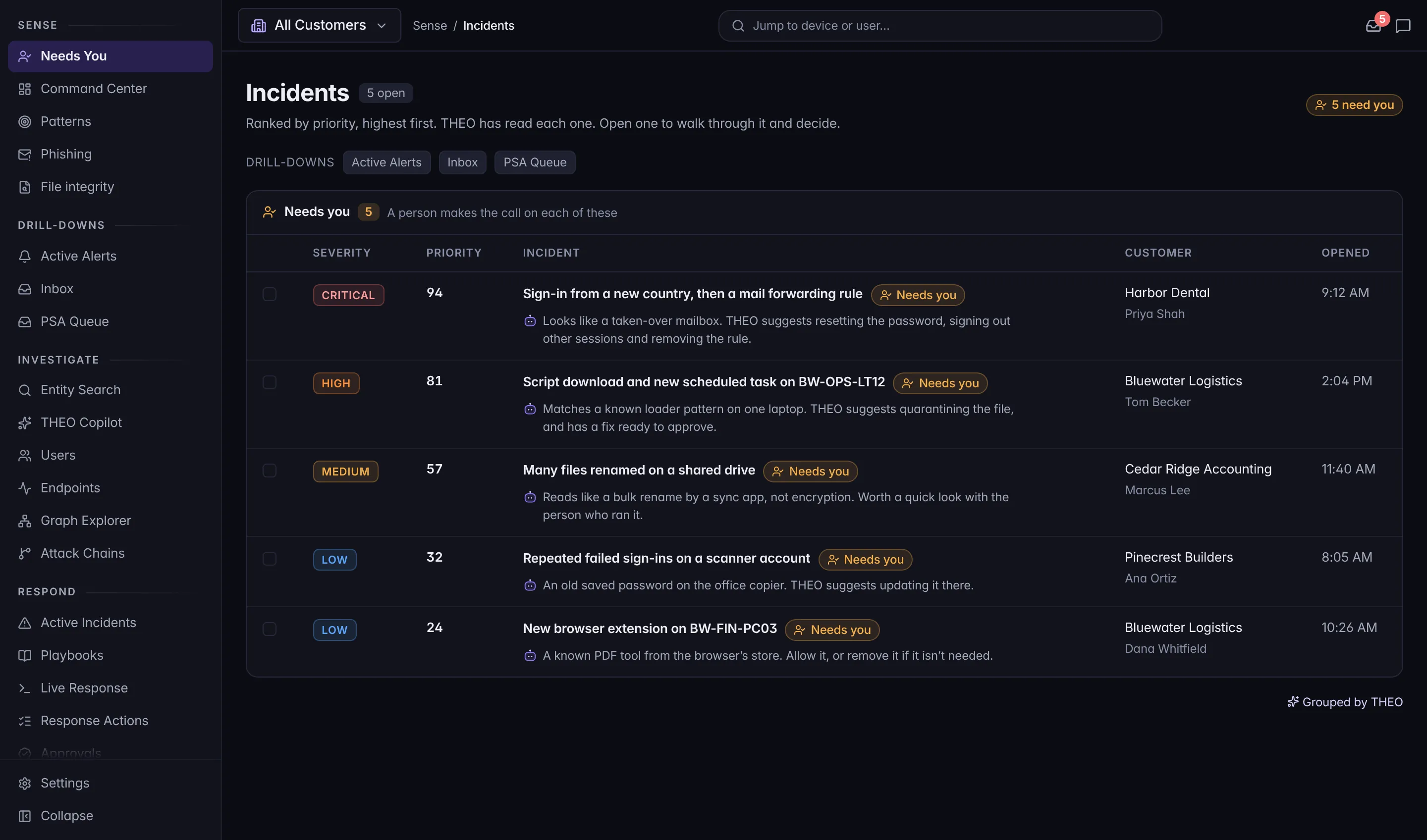
Where it lands: one list of incidents in Defend, our security console, ranked by priority, with the ones that need a person at the top.
When something is wrong
Response that doesn’t wait for a meeting.
Defend spots the trouble. THEO, our AI, has looked into it before a person opens the alert: what it thinks is happening, how sure it is, and what to do about it. A person makes the big calls, and all of it is on the record.
- THEO does the reading. It links the alerts and explains the case in plain English.
- A person approves anything drastic. Signing an account out or cutting a laptop off the network always waits for a human.
- Every step is written down. Who approved what, when, and what happened next.
Live now
Call, open a ticket, or chat with THEO. Any hour.
24/7/365, THEO picks up however you reach us and gets to work. For a long list of everyday problems, that means real action and a fix that starts while you’re still there, not a ticket number and a wait.
- Locked out
- Password reset
- MFA reset
- VPN won’t connect
- Printer trouble
- Wi-Fi trouble
- Missing shared drive
- Deleted email
- Approved software
- It checks it’s really you. A Security PIN or a passkey comes before anything sensitive.
- Anything risky still waits for a person. THEO can’t wipe a device, delete files, or switch off your protection. That’s locked.
- It keeps a record. Every step THEO takes is logged where our team can see it.
Coming very soonText us.
AI, built for your business
Grow fast. Stay safe.
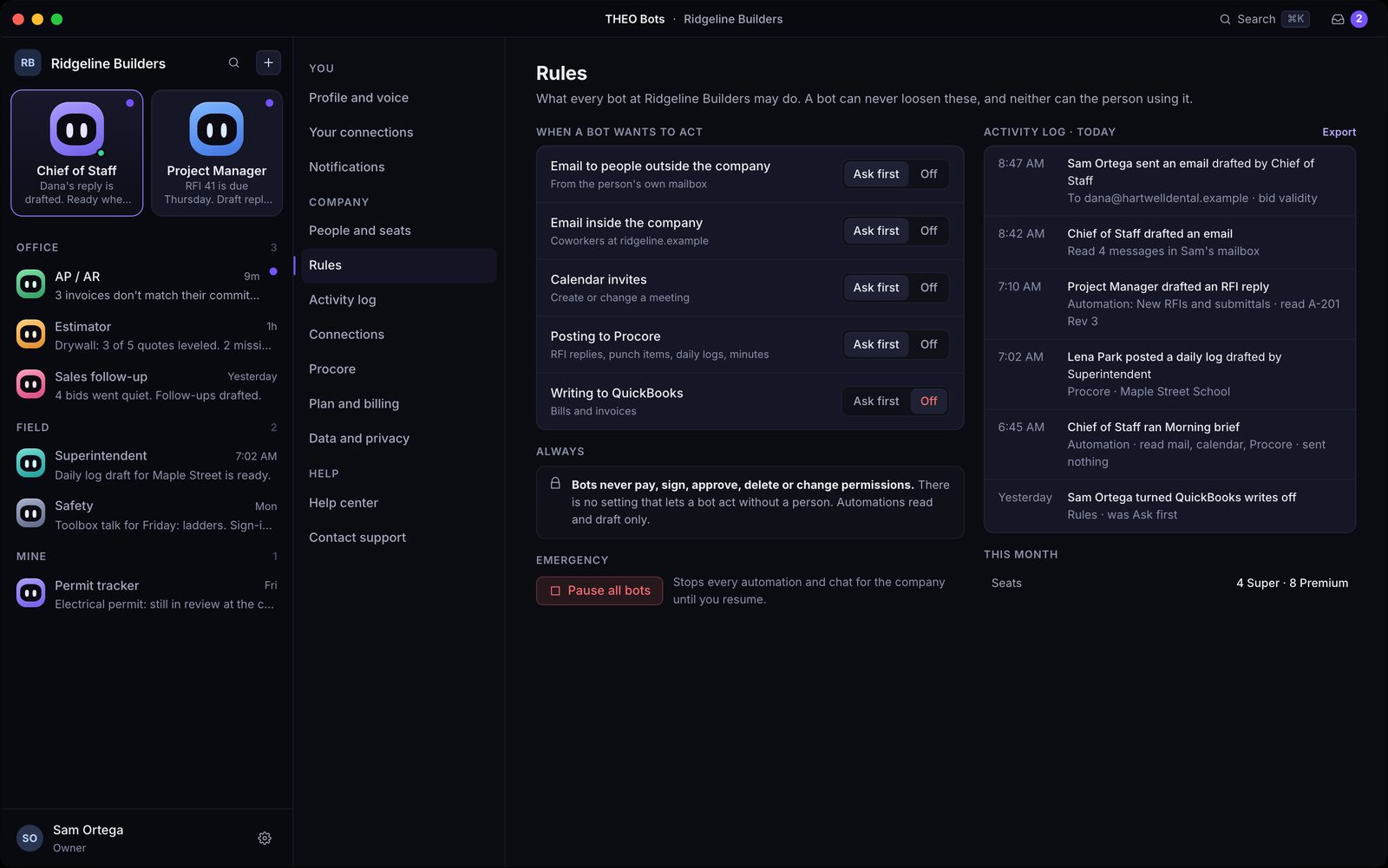
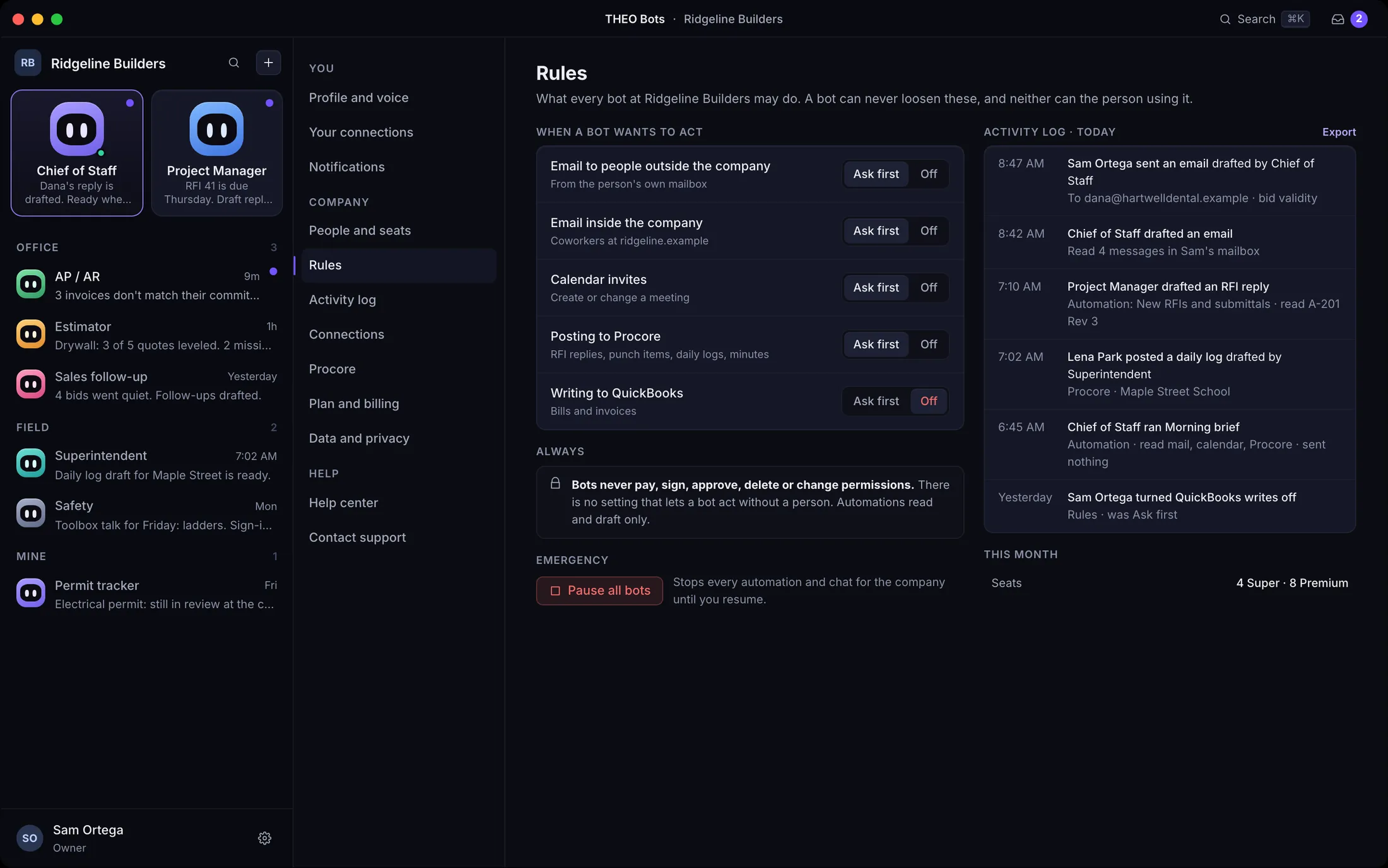
AI is only useful if you can trust it with real work. THEO Bots are AI helpers set up around the way your business runs, and they work inside the same platform that protects it.
Coming soonTHEO Bots. One page of rules that every bot in the company has to follow.
It works through what you approve
A bot reaches your mail, files, and other systems only through connections you’ve signed off on.
A person says yes
Nothing is sent, filed, or changed until someone who’s signed in confirms it.
Your data stays yours
THEO is private AI. What you put in stays out of public models.
The groundwork
The fundamentals come with the package.
None of this shows up later as a surprise extra. It’s how we run IT.
- Threat detection and prevention
Finding and blocking threats before they turn into an incident.
- Email protection
Hawkeye for the email in front of you, and Defend for the mail that has already been delivered.
- Security Training
Your people are part of the defense. Short lessons show them what a suspicious message looks like, and AI Safety training covers the tools they’re already using.
- Firewall and antivirus management
The edge of your network and the computers on it, managed and kept current instead of left on default settings.
- Cyber Readiness and compliance
A score across eight areas, the evidence behind it, and help getting ready for an audit.
- Data encryption
Sensitive information is encrypted, so it stays unreadable to anyone who shouldn’t have it.
- Incident response
A plan for the bad day, agreed before it arrives, and the people and tools to carry it out.
Live now
Hawkeye. A second opinion on any email.
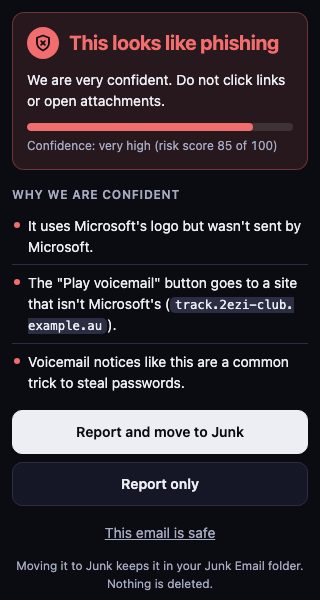
Most trouble still starts in the inbox. Hawkeye is an Outlook add-in that checks the message you have open, tells you whether it looks like phishing, and gives the reasons in plain English.
If something’s wrong, one click moves it out of your inbox and tells our team, so we can look into it and protect everyone else.
- Outlook on the web
- Outlook for Windows
- Outlook for Mac
- Outlook on iPhone and Android
About compliance
We won’t hand you a badge and call you certified.
What we will do is measure where you stand, keep the evidence in one place, and work the gaps with you. Then we’ll tell you what an auditor or assessor still has to confirm. That’s more use to you than a logo in a footer.
Talk to a person
Tell us what you’re worried about.
Call, or book a time and we’ll call you. You’ll talk with someone who can tell you where you stand.