
Not sure about an email? Ask Hawkeye.
Hawkeye is a button in Outlook that checks the email you have open and tells you, in plain English, whether it looks like phishing. If it does, one click reports it to our team and moves it out of your inbox.
How it works
Three steps. About five seconds.
Use it any time an email feels even a little off: an unexpected invoice, a password warning, a link you weren’t expecting.
Open the email
Click the message so it’s showing. Don’t click any links in it yet.
Click Hawkeye
It opens beside the message and checks it. You get a result, a risk score, and the reasons behind it, in plain English.
Report it if it looks wrong
Report and move to Junk takes the email out of your inbox and opens a ticket with our team. Report only tells us and leaves it where it is.
Want it on all the time? Pin Hawkeye open and it checks each email as you click on it.
What you get back
One of three answers, and the reasons why.
Hawkeye checks who really sent the message, whether the sender is imitating a brand or your own company, where the links go, and whether the wording is trying to rush you.
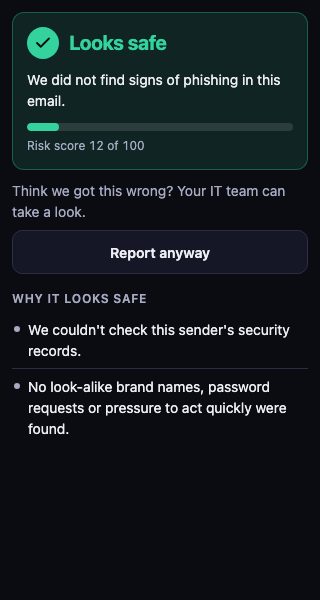
Looks safe
No signs of phishing were found. Still have a doubt? Choose Report anyway and we’ll take a look.
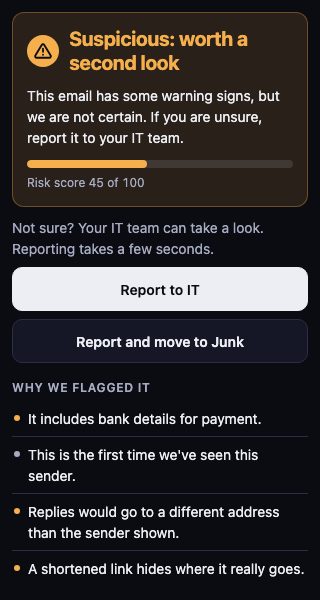
Suspicious: worth a second look
Some warning signs, but nothing certain. Don’t click links or reply. Choose Report to IT, or Report and move to Junk to get it out of your inbox as well.
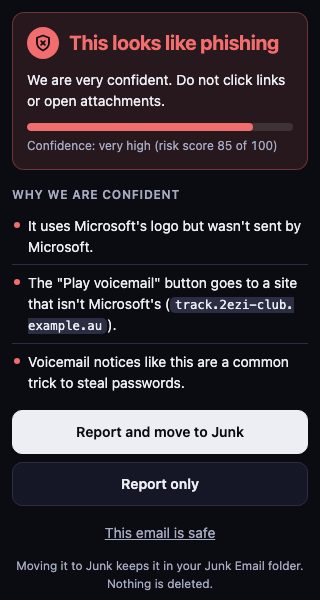
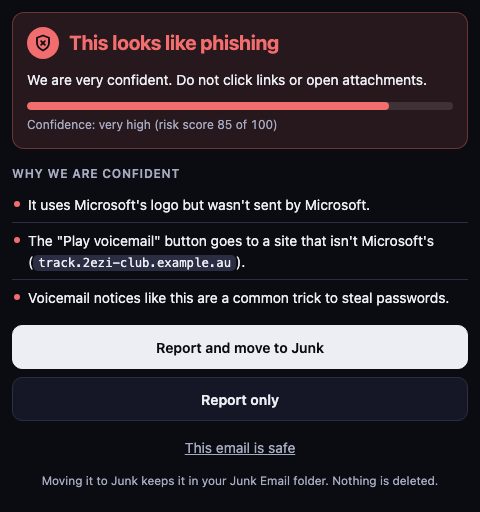
This looks like phishing
Very likely an attack. Choose Report and move to Junk or Report only. If you know the sender and the email is fine, say so with This email is safe.
The Hawkeye pane in Outlook. Sample emails.
- Nothing is deleted. A reported email goes to your Junk Email folder, and it stays there until you decide.
- It says when it might be wrong. Hawkeye uses AI, and AI makes mistakes. The pane tells you so, which is why every result comes with its reasons.
After the email lands
Defend keeps checking. After delivery.
Hawkeye is the part your people see. Behind it, Defend works on mail in Microsoft 365 and Google Workspace that has already reached a mailbox.
- Quarantine, with a way back
A message that turns out to be phishing can be pulled out of the mailboxes it reached. If we got it wrong, it can be put back.
- Impersonation checks
Mail that claims to come from your boss, a supplier, or a brand you know gets checked for the signs of a business email scam.
- Blocklists
A sender or a whole domain that proves hostile can be blocked for your company.
- Breach watch
After a phishing email reaches someone, we keep watch on that person’s account for signs that it worked.
Where it runs
Inside Outlook. Nothing to download.
Yes, in the Outlook app on iPhone and Android. Hawkeye also runs in Outlook on the web, Windows and Mac. Your JPtheGeek team switches it on for your company, and it appears in Outlook by itself.
- Outlook on the web
- Outlook for Windows
- Outlook for Mac
- Outlook on iPhone and Android
Good to know
What happens when I report an email?
A ticket goes to the JPtheGeek team with the details we need to investigate. If it’s an attack, we can act across your company to keep others safe. You don’t need to forward anything or fill in a form.
Does Hawkeye read all my email?
No. Hawkeye only checks the email you have open when the pane is showing. It can’t send email on your behalf, and it can only move an email to Junk when you report it, or when it’s very sure the email is phishing.
What if Hawkeye gets it wrong?
Tell us. Report any email you’re unsure about, even one marked safe. Every report helps us tune Hawkeye for your company.
I already clicked a link or entered my password. Now what?
Don’t wait. Call (317) 936-3300 right away. The sooner we know, the faster we can lock things down. Changing your password quickly makes a big difference.
Keep going
Talk to a person
Tell us what’s slowing you down.
Call, or book a time and we’ll call you. Either way you talk with someone who can answer the question.